BitKan Demo Trading User Guide
Updated on:
1. What Is Demo Trading?
BitKan Demo Trading is a feature designed to help users test and evaluate strategies. In a simulated environment, users can create and run strategies using virtual funds without investing real assets. This allows users to experience how a strategy works, test different parameter configurations, and observe its performance under current market conditions.
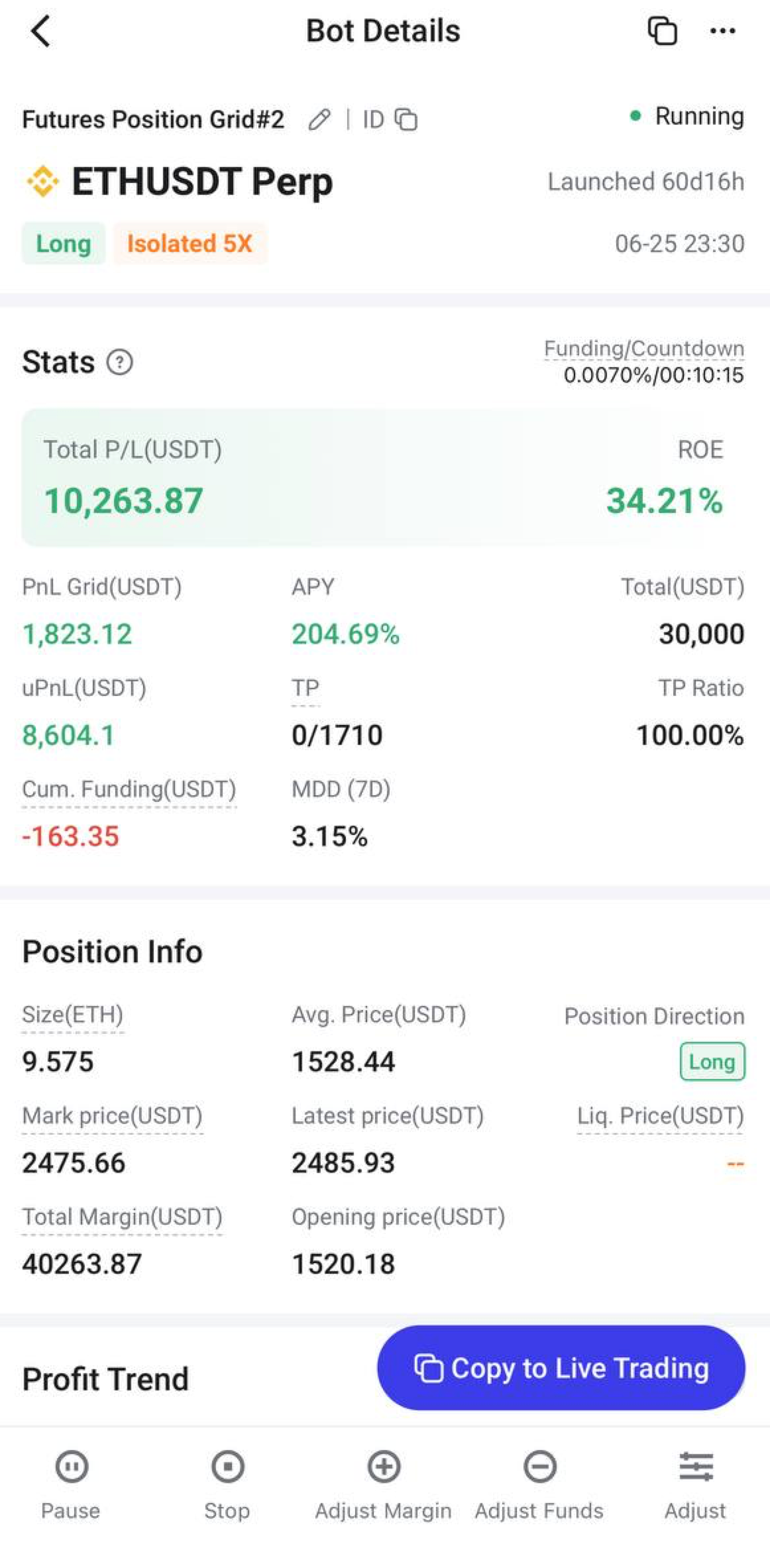
If the simulated results meet your expectations, you can go to the strategy details page and click [Copy To Live Trading] to quickly copy the current strategy configuration and create a live strategy.
In simple terms:
Test in Demo Trading → Monitor Strategy Performance → Adjust Strategy Parameters → Start Live Trading with One Click when Satisfied
Note: All funds, profits, and trading results in Demo Trading are simulated data and will not affect the assets in your real account.
2. Supported Scope of Demo Trading
Currently, only Strategy Trading supports Demo Trading on BitKan. Spot Trading and Futures Trading do not currently support Demo Trading.
Supported Strategy Types
Spot Strategies:
Infinity Grid; Spot Martingale; DCA Strategy; RangeGrid; Spot Ladder Grid; Two-WayGrid; Infinite Grid; Multi-Coin Smart Holding
Futures Strategies:
USDT-M Futures Grid; Futures Martingale; Futures Base Position Arbitrage
Note: Parameter settings and operating logic vary by strategy. The specific strategy types and features supported are subject to the actual options displayed on the BitKan APP Demo Trading page.
3. How to Access Demo Trading?
Navigation Path:
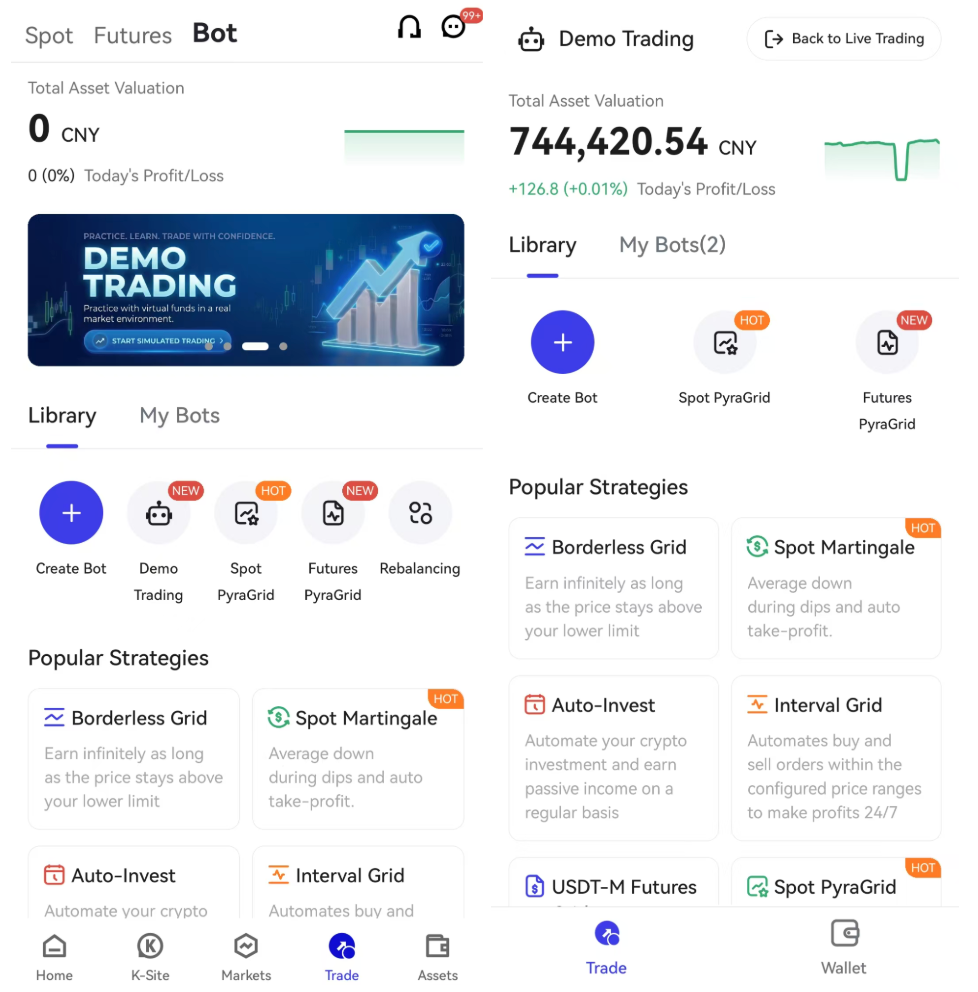
[Trade] → [Strategy] → [Demo Trading] → [Create Bot]
Step 1: Go to the Strategy Page
Open the BitKan APP, tap [Trade] in the bottom navigation bar, and enter the Strategy page.
Step 2: Enter Demo Trading
On the Strategy page, tap [Demo Trading] to enter the simulated trading environment.
Step 3: Create a Demo Strategy
After entering Demo Trading, tap [Create Strategy], select the strategy you want to test, and configure the corresponding parameters based on the selected strategy.
Step 4: Run the Demo Strategy
After confirming the strategy parameters, create the strategy. The strategy will run using virtual funds.
You can view the performance and related data of your demo strategies under [My Strategies].
4. What Data Can I View in Demo Trading?
Depending on the strategy type, you can view relevant strategy performance data, including:
Total Assets, Total Investment, Total Profit, and ROI
Grid Profit and Floating Profit
Running Time and Number of Arbitrage Transactions
Strategy Status and Strategy Parameters
Historical Performance Records
These data points can help you evaluate strategy performance, determine whether the current parameters are appropriate, and decide whether to proceed with live trading.
The specific data displayed are subject to the actual information available on the BitKan APP.
5. What Is the Difference Between Demo Trading and Live Trading?
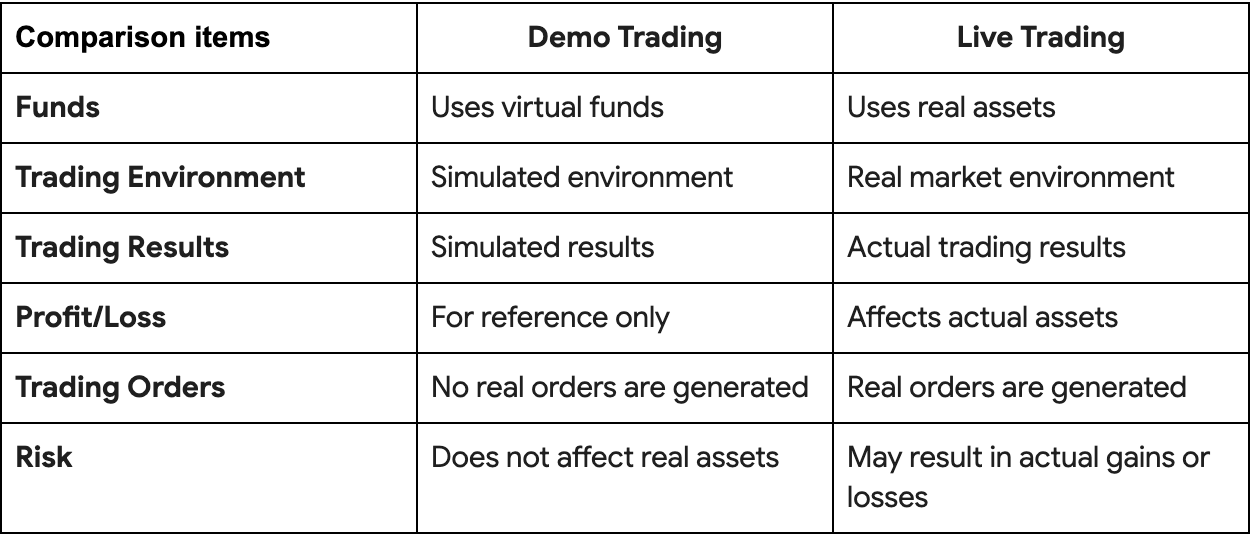
Note: Demo Trading is intended for strategy testing and does not guarantee the same results in live trading. Actual trading performance may vary due to market volatility, execution prices, fees, funding rates, liquidity, and other factors.
6. Frequently Asked Questions
1. Do I need to make a deposit to use Demo Trading?
No. Demo Trading uses virtual funds, so you can experience Strategy Trading without depositing real assets.
2. Can I withdraw the profits generated from Demo Trading?
No. The funds and profits generated through Demo Trading are virtual data and do not represent real user assets.
3. Will Demo Trading affect my real account?
No. Demo Trading and Live Trading operate independently. Demo strategies do not use your real assets or generate real trading orders.
4. Which strategies are supported in Demo Trading?
Supported Spot Strategies include Infinity Grid, Spot Martingale, DCA Strategy, Range Grid, Spot Ladder Grid, Two-Way Grid, Infinite Grid, and Multi-Coin Smart Holding.
Supported Futures Strategies include USDT-M Futures Grid, Futures Martingale, and Futures Base Position Arbitrage.
The specific strategies supported are subject to the options displayed on the BitKan APP.
5. Are the profits from Demo Trading the same as those from Live Trading?
Not necessarily. Actual trading may be affected by factors such as market volatility, execution prices, trading fees, funding rates, and market liquidity. Therefore, Demo Trading results are for reference only and do not represent the potential returns of Live Trading.
6. How do I return to Live Trading?
On the Demo Trading page, tap [Back to Live Trading] to return to the live trading environment.
7. What happens if I run out of initial funds in Demo Trading?
You can add more virtual funds for Demo Trading.
On the Demo Trading page, tap [Assets] → [Spot] → [Add Funds]. Your spot holdings will then be refreshed to the initial amount.
8. My demo strategy is performing well. Can I start Live Trading directly?
Yes. If the demo strategy performs as expected, go to the strategy details page and tap [One-Click Live Trading] to quickly copy the current strategy configuration and create a live strategy.
7. Risk Disclosure
Demo Trading is intended for familiarizing yourself with the Strategy Trading process, testing strategy parameters, and understanding how strategies operate. Digital asset prices are highly volatile, and Strategy Trading does not guarantee profits.
Demo Trading results do not represent actual trading performance and do not constitute any investment advice.
Before engaging in Live Trading, please make sure you fully understand the strategy's operating mechanism and potential risks. Always trade cautiously based on your own risk tolerance and financial situation.