How to Choose a Network When Making a Deposit?
Updated on:
Choosing the Correct Deposit Network
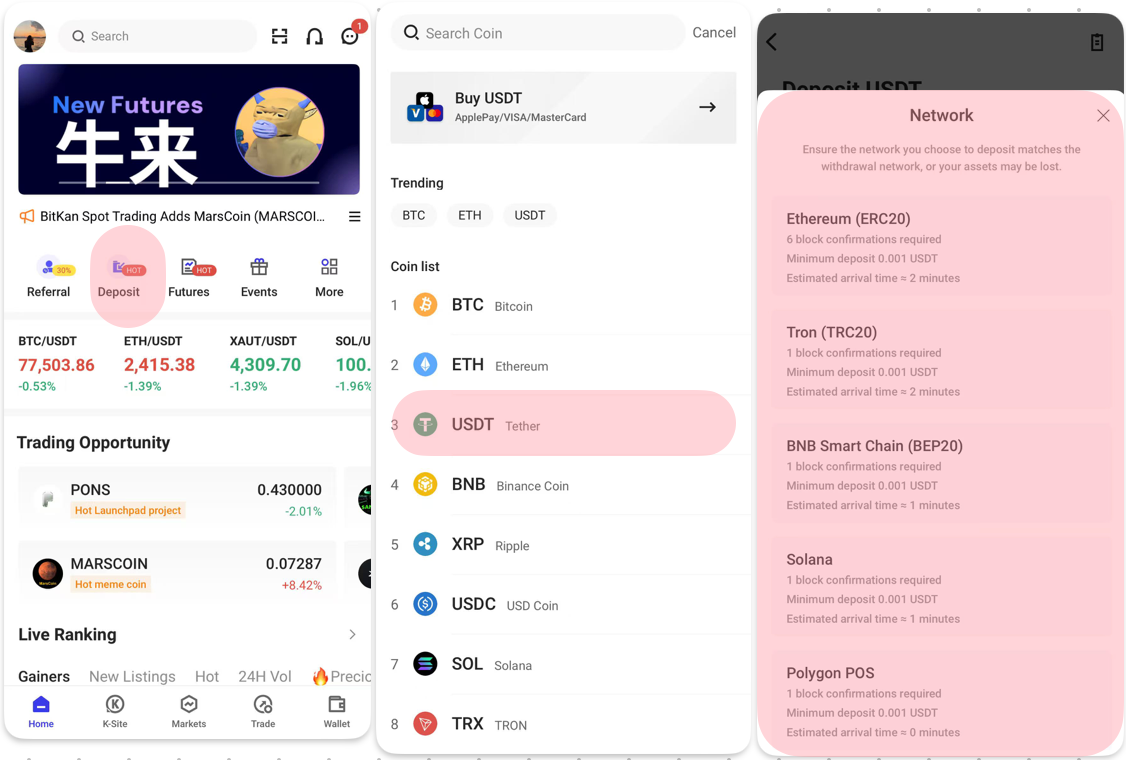
Ensure the deposit network on BitKan matches the withdrawal network on the external platform to avoid losing your assets.
Example (USDT Deposit Process):
1. Open the BitKan App → Tap [Deposit] → Select USDT → Choose a deposit network (e.g., TRC20, ERC20, BEP20, SOL).
2. Networks vary in speed, security, and fees:
- TRC20: Fast, low fees, for small deposits.
- ERC20: Secure, slower, higher fees, for larger deposits.
3. Copy the deposit address and paste it in the Withdraw section of your external wallet or exchange. Complete the withdrawal to finalize the deposit.