logo
  • menu
  • Markets
  • ETFs
  • Live
  • Spot
  • Futures
  • Learn
  • Sign In
  • Sign Up
  • Downloads
  • English
  • |
  • USD
  • |
Sign Up
Crypto PricesLearnLatest NewsDownloadsMarketsSpotAnnouncements
Home/
Learn/
Tutorials

Deposit And Withdraw Cryptocurrency Guide By BitKan Crypto Exchange

By Barry Stidham
Aug 24, 2022
4 
★
★
★
★
★
★
★
★
★
★
 401 User Rating
Share

Learn to deposit and withdraw cryptocurrency in less than 2 minutes!

How To Deposit Cryptocurrency?

Step 1: Open up the BitKan APP and click on [Wallet]at the bottom right corner. Next, click on [Deposit]which is located in the middle. In this section, you can select which coins you would like to deposit by entering the coin name (Eg. Bitcoin) or its acronym (Eg. BTC). After selecting your desired coin, you will be given the specific coin’s deposit address (a unique string of numbers and alphabets) of which you can deposit in. For a better understanding of the steps, you may check out our YouTube video.
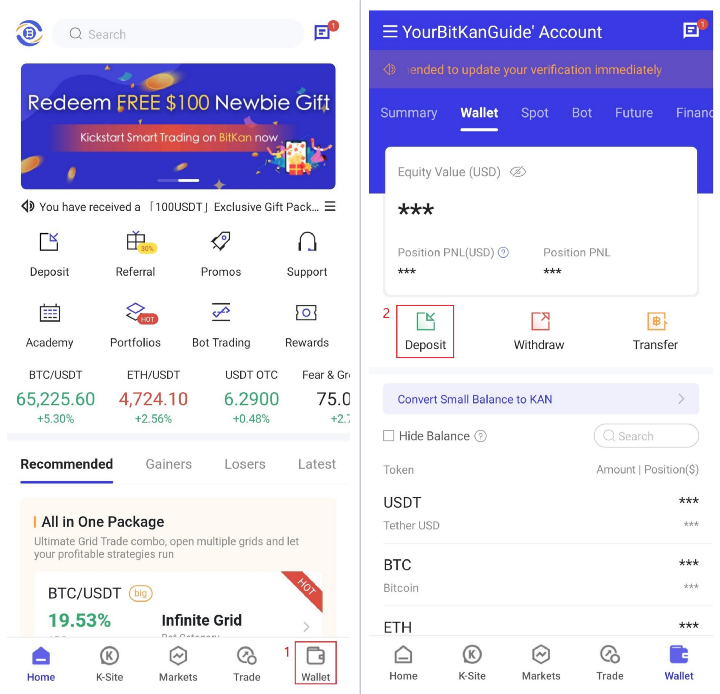
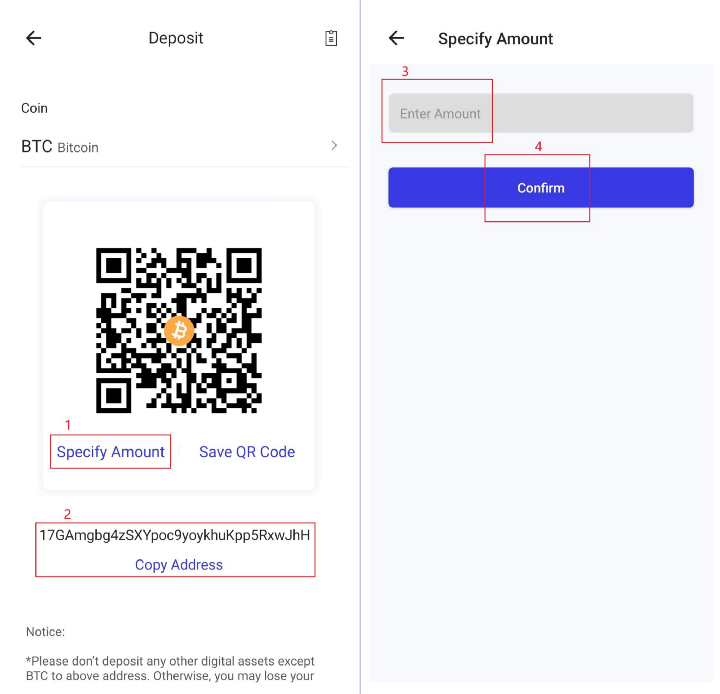
Step 2: Each individual coin has its own unique deposit address. In this section, you have to specify the amount of coins you intend to deposit. Also, you will see the available networks for depositing the coin. Please choose the deposit network carefully and make sure the selected network is the same as the network of the platform you are withdrawing your funds from. If you select the wrong network (Eg. Depositing ETH to a BTC address), you will lose your funds.

Copy your deposit address and paste it to the address field onto the platform you intend to withdraw crypto from. After confirming the withdrawal request, please wait patiently for the transfer to be processed. It takes time for the transaction to be confirmed. The confirmation time varies depending on the blockchain and its current network traffic. The funds will be credited to your BitKan account shortly after.

How To Withdraw Cryptocurrency?

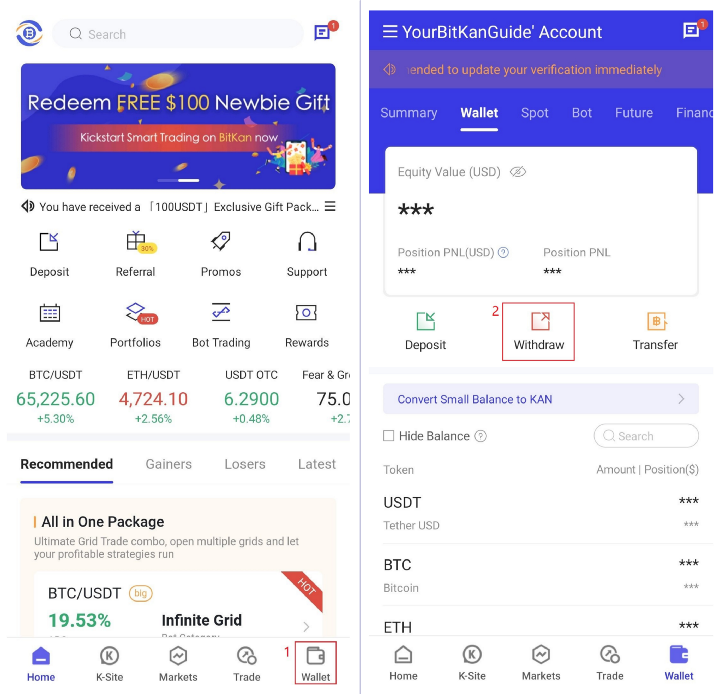
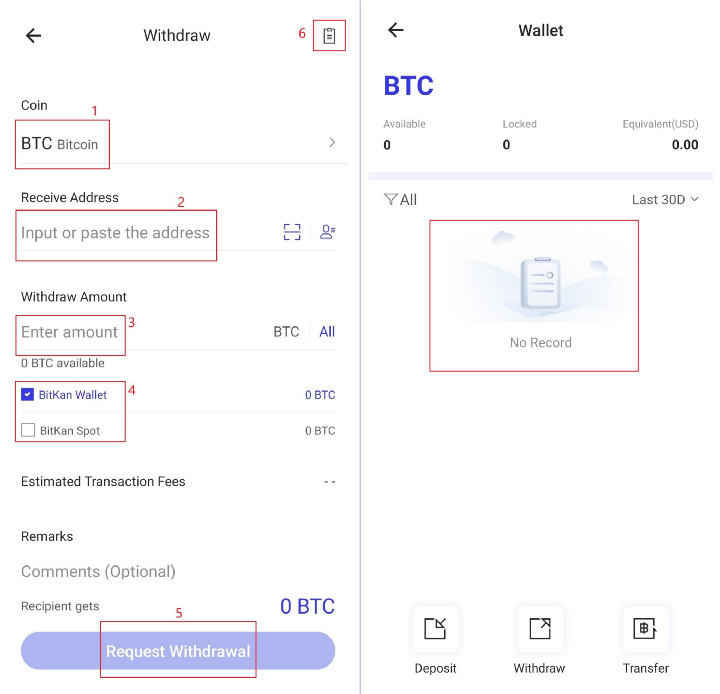
Step 1: Open up the BitKan APP and click on [Wallet]at the bottom right corner. Next, click on [Withdraw]which is located in the middle. In this section, you can select which coins you would like to withdraw by entering the coin name (Eg. Bitcoin) or its acronym (Eg. BTC).
Step 2: After selecting your desired coin, you are to fill in the address you want to withdraw to and select the network. Please choose the network carefully and make sure that the selected network is the same as the network of the platform you are withdrawing funds to. If you select the wrong network, you will lose your funds. Enter the withdrawal amount, and you will be able to see the corresponding transaction fee and the final amount you will receive. Tap [Request Withdrawal]to proceed. You will be prompted to confirm the transaction again. Please check carefully and confirm your withdrawal. After confirming the withdrawal request, please wait patiently for the transfer to be processed. You may also view your transaction history by clicking on the [record document]icon on the top right.

Warning: If you input the wrong information or select the wrong network when making a transfer, your assets will be permanently lost. Please make sure the information is correct before you confirm the transaction.
Congratulations! You have successfully completed your first digital currency deposit and withdrawal on BitKan!

Disclaimer: The information on this page may have been obtained from third parties and does not necessarily reflect the views or opinions of BitKan. This content is provided for general informational purposes only, without any representation or warranty of any kind, nor shall it be construed as financial or investment advice. BitKan shall not be liable for any errors or omissions, or for any outcomes resulting from the use of this information. Investments in digital assets can be risky. Please carefully evaluate the risks of a product and your risk tolerance based on your own financial circumstances. Products mentioned in this article may not be available in your region.

Related Articles

  • Completing KYC And Buying Bitcoin Guide By BitKan Crypto Exchange

    Completing KYC And Buying Bitcoin Guide By BitKan Crypto Exchange

    Buy your first digital asset in less than 5 minutes! First, ensure that you have downloaded and registered a BitKan Account. If you haven’t done so, you may download the APP here.
    Sherry Cantwell
    Aug 24, 2022
  • How To Install and Sign Up For a BitKan Account (APP)?

    How To Install and Sign Up For a BitKan Account (APP)?

    Simple steps to register an account and download bitkan app
    Jerry McNeill
    Aug 24, 2022
  • What Is Circle Arc Whitepaper? How to Join Circle Arc Testnet?

    What Is Circle Arc Whitepaper? How to Join Circle Arc Testnet?

    The Arc whitepaper serves as the foundational technical blueprint for a next-generation Layer 1 blockchain built by Circle to integrate programmable stablecoins with on-chain financial innovation.
    Sherry Cantwell
    May 13, 2026

Latest Articles

Crypto Basics

Tutorials

Currencies

Investing

  • What Are Short Liquidations? How Can Traders Prevent Them in Crypto?

    What Are Short Liquidations? How Can Traders Prevent Them in Crypto?

    A short liquidation is a mandatory event within derivatives markets where a cryptocurrency exchange automatically closes a leveraged short position.
    Cornell Rachel
    Jun 22, 2026
  • What Is Rehypothecation Risk in Crypto? How to Protect Yourself

    What Is Rehypothecation Risk in Crypto? How to Protect Yourself

    Rehypothecation is a practice where a lending platform takes collateral pledged by its clients and uses it for its own purposes.
    James Dean
    Jun 17, 2026
  • What Is pERC20? How Does This Ethereum Token Standard Work?

    What Is pERC20? How Does This Ethereum Token Standard Work?

    The pERC-20 framework is an experimental Ethereum Improvement Proposal designed to fundamentally alter how standard tokens operate on public networks,
    Jun 12, 2026
  • What Are Crypto Prediction Markets? A Complete Guide for Beginners

    What Are Crypto Prediction Markets? A Complete Guide for Beginners

    Crypto prediction markets are peer-to-peer decentralized financial platforms where participants trade contracts tied to the outcomes of real-world events, such as elections, sports, or economic data releases.
    Jun 12, 2026
  • What is the MSX X Card? Understanding the New Crypto Card

    What is the MSX X Card? Understanding the New Crypto Card

    The MSX X Card is a financial instrument launched by the MSX Maitong platform that functions as a payment gateway for digital assets
    James Dean
    Jun 8, 2026
View more data 
BTCBTC(BTC)
$0
--(Last 24h)
SpotFutures

Top

View more
  1. 1How To Sign Up For A BitKan Account (Web)?
  2. 2When Is Bitcoin Halving 2024? What Does Bitcoin Halving Do?
  3. 3What is Etherscan Used For and How to Find Token Decimal on Etherscan
  4. 4What is USDC used for? Why is USDC used?

Top Gainers

View more
Audiera
AudieraBEAT

$2.3721

+40.24%
Solstice
SolsticeSLX

$0.2817

+39.59%
Heima
HeimaHEI

$0.1195

+31.17%
Collector Crypt
Collector CryptCARDS

$0.3054

+25.94%
My Neighbor Alice
My Neighbor AliceALICE

$0.1483

+21.86%

Top Trending

View more
Heima
HeimaHEI

$0.1192

+30.85%
Audiera
AudieraBEAT

$2.3751

+40.41%
SpaceX
SpaceXSPCXB

$158.110

+5.39%
Monero
MoneroXMR

$326.150

+1.30%
Block Street
Block StreetBSB

$0.3215

-2.58%

Recently added

View more
Arcium
ArciumARX

$0.3082

-19.32%
Ambire AdEx
Ambire AdExADX

$0.0554

0.00%
Re
ReRE

$0.7243

-12.84%
o1 exchange
o1 exchangeO

$0.5498

-10.37%
SpaceX
SpaceXSPCXB

$158.110

+5.39%

Latest News

View more
  1. 1Uniswap Soars 22% as Altcoins Rally While Bitcoin Stalls
  2. 2HYPE Surges 6%: Suspected Insider Whale Nabs $34M in Gains
  3. 3SpaceX Prices Record $75B IPO at $135, Hits $1.8T Valuation
  4. 4Stablecoin Secondary Market Rules Pit Banks Against Crypto
  5. 5Bitcoin and Gold Tumble Amid Rising Inflation and Rate Bets
About Us
  • About BitKan
  • Contact Us
  • Announcements
  • VIP Program
  • BitKan Ambassador
  • Institutional Services
Products
  • Spot
  • Futures
  • Crypto Prices
  • Learn
  • News
  • Markets
  • How to Buy Crypto
  • BTC to USD Calculator
  • Reward
Help
  • Help Center
  • Email Us
  • Live Chat
  • Download APP
  • Listing Application
  • Buy Bitcoin
  • Buy Ethereum
  • Buy Dogecoin
  • Buy Altcoins
Terms
  • Terms of Use
  • Privacy Policy
  • Trading Rules
  • Fee
K-Site
English
About Us
+
  • About BitKan
  • Contact Us
  • Announcements
  • VIP Program
  • BitKan Ambassador
  • Institutional Services
Products
+
  • Spot
  • Futures
  • Crypto Prices
  • Learn
  • News
  • Markets
  • How to Buy Crypto
  • BTC to USD Calculator
  • Reward
Help
+
  • Help Center
  • Email Us
  • Live Chat
  • Download APP
  • Listing Application
  • Buy Bitcoin
  • Buy Ethereum
  • Buy Dogecoin
  • Buy Altcoins
Terms
+
  • Terms of Use
  • Privacy Policy
  • Trading Rules
  • Fee
K-Site
+
  • Twitter
  • Facebook
  • Telegram
  • YouTube
  • Instagram
  • Medium
  • Linkedin
@2012-2026 BITKAN.com
