How to View BitKan Deposit Address (WEB Version)
Updated on:
If you have digital assets on other platforms or wallets (other digital currency trading platforms, hardware wallets, software wallets) and want to deposit them into BITKAN for trading, you can choose to deposit. When depositing, all digital assets require a deposit address; some digital assets not only need a deposit address but also require filling in a MEMO (also known as Tag/Label). So, how do you view the address and MEMO (also known as Tag/Label) when depositing? You can refer to the following steps:
1. Log in to the BITKAN official website — click [Wallet] in the upper right corner — select [Deposit];
2. Choose the currency you want to deposit, such as [USDT] — select the available deposit network for USDT, for example, [TRX Tron (TRC20)], to view the deposit address for that currency. The address can be copied with one click.
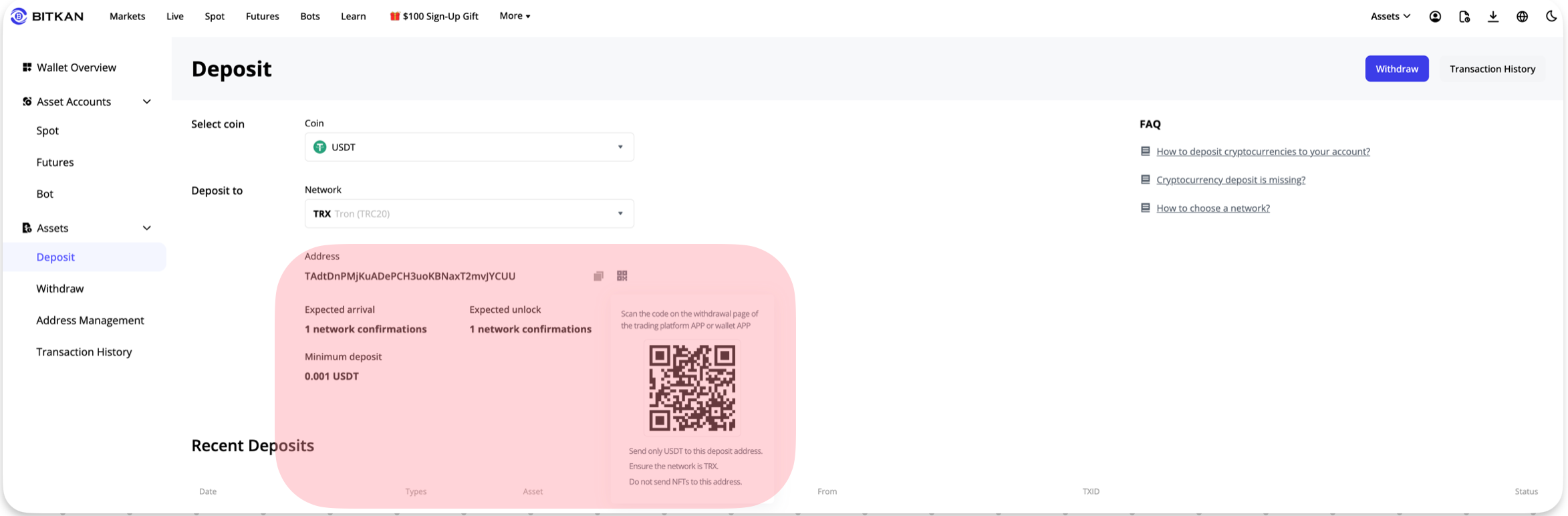
Reminder: If the mainnet of the currency you selected requires a MEMO (also known as Tag/Label, usually a string of numbers), there will be a red text reminder on the page. Please pay attention to it.
After copying the address/MEMO, you can open another platform or wallet, select withdraw/withdrawal, paste the address/label you just copied from BITKAN, fill in the relevant information as prompted, and confirm to complete the deposit.
Note:
Please ensure you have completed KYC before topping up.
When selecting the deposit network, the [withdrawal/withdrawal mainnet] of other trading platforms or wallets must match the deposit network of BITKAN, for example, both should be Tron (TRC20), otherwise the assets may be lost.
Not all currencies or networks require a MEMO. When depositing, you need to operate according to the actual situation: if there is a MEMO, you must fill in both the deposit address and MEMO when depositing these currencies, otherwise the assets may be lost; if there is no MEMO, you only need to fill in the deposit address when depositing.